
My Anchor Watch Pro3.2.0 - Google Play
You'll be able to see results in few seconds.
Publisher Description
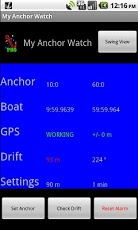
My Anchor Watch aims at being the best and most reliable Safety Tool of its kind for sailors and yachters. Low battery consumption was a high priority design requirementMy Anchor Watch is your personal Anchor Watch. It is easy to use, and will give you peace of mind while at anchor. One of the best apps for anchoring. For sail- and power-boatsIt has more features than similar apps costing more than twice as muchPlease note that GPS performance and accuracy is determined by your device's hardware, and not by this App. If you experience bad accuracy or many false Alarms, you should try to move the device to another place, e.g. on deckIF YOU ARE ANCHORING AT E.G. 30 FT, USE AT LEAST 90 FT CHAIN, AND SET DRIFT LIMIT TO AT LEAST 130 FTNew feature: Option to Set Anchor Position 'by Projection' after your boat has drifted to the end of the cable/chainNew feature: Optional ALARM SECTOR. Can also be used as Tide/Wind Change AlarmSet up an Alarm Sector to avoid other boats, rocks, shallow water, or simply to get a notification of a change of wind directionMy Anchor Watch makes sure that you are alerted if the anchor fails to hold, and starts draggingWhen you are lying in your bunk at night, you can easily use My Anchor Watch to check that the boat is still where you expect it to beThe battery is conserved by having the app running in the background, and by letting the user optionally configure a slow (selectable) GPS Update RateAfter the Anchor has been set, you can close the User Interface screen, letting My Anchor Watch continue running in the background, saving power. After a while you will learn to interpret the various warning sounds, such as the GPS Status Warning signalWhen your boat exceeds the Drift Limit ("Scope"), or enters the optional Alarm Sector - both set by you, an Alarm is activatedAccess to the Internet or a Telephone Network is normally not required. If you want My Anchor Watch to send SMS Messages, however, you need access to the Telephone Network(*) NOTE that reception of SMSs will NOT work on tablets without a SIM card, but Messages from this App can now be SENT by Email (if the device has access to Internet)My Anchor Watch can also be used as an Emergency NavigatorHave it with you at all times, also when you are a guest on other yachts. For your own sake, and for the safety of your host and his crew. Help them to stop worrying about their anchorFeatures:- GPS Reception- Display of Boat and Anchor Position- Display of GPS Status and Accuracy- Display of GPS Track History- Display of User Settings- A Graphical Swing View shows how your boat is swinging- Alarm when boat exceeds set Drift Limit, comes into Alarm Sector, or at GPS failure- Audible and/or Vibrator Alarm- Optional selection of your own Audible Anchor Alarm sound/signal- Optional Automatic Resetting of the Anchor Alarm (when the Alarm Condions become false)- Audible and Visual Warnings at non-fatal GPS issues (such as poor accuracy and temporary unavailability)- Optional sending of an SMS or Email message to another phone at various Alarm events- Sending an SMS or Email Status Message (including the Boat Position, Alarm Status and all other Statuses and Settings) when an SMS is received from another phone - with the selected/settable Password- Optional Sending of Status Messages at fixed Intervals- All sounds and indications are configurable- Configurable GPS Update Rates (can even be set to 0)- Optional Manual Check of Drift at any time- Configurable Position Formats- Optional Shaking of phone available to Reset the Alarm- Selectable Nautical Units- Bearing Compass- Optional False Alarm Filter- All configuration settings are permanently saved- All processing done in the Background- Low Battery consumption - Optional use as an Emergency NavigatorNote that for the Blackberry, there is another app with the same name, with which we are not affiliated. Please refer to MyAnchorWatch.com
About My Anchor Watch Pro
The company that develops My Anchor Watch Pro is terboel. The latest version released by its developer is 3.2.0.
To install My Anchor Watch Pro on your Android device, just click the green Continue To App button above to start the installation process. The app is listed on our website since 2013-07-01 and was downloaded 0 times. We have already checked if the download link is safe, however for your own protection we recommend that you scan the downloaded app with your antivirus. Your antivirus may detect the My Anchor Watch Pro as malware as malware if the download link to com.terboel.myanchorwatch is broken.
How to install My Anchor Watch Pro on your Android device:
- Click on the Continue To App button on our website. This will redirect you to Google Play.
- Once the My Anchor Watch Pro is shown in the Google Play listing of your Android device, you can start its download and installation. Tap on the Install button located below the search bar and to the right of the app icon.
- A pop-up window with the permissions required by My Anchor Watch Pro will be shown. Click on Accept to continue the process.
- My Anchor Watch Pro will be downloaded onto your device, displaying a progress. Once the download completes, the installation will start and you'll get a notification after the installation is finished.
Program Details
System requirements
Download information
Pricing
Version History
version 3.2.0
posted on 2013-07-01
version 3.2.0
posted on 2013-07-01
Several fixes and updates
Disclaimer
Official Google Play Link
We do not host My Anchor Watch Pro on our servers. We did not scan it for viruses, adware, spyware or other type of malware. This app is hosted by Google and passed their terms and conditions to be listed there. We recommend caution when installing it.
The Google Play link for My Anchor Watch Pro is provided to you by apps112.com without any warranties, representations or guarantees of any kind, so access it at your own risk.
If you have questions regarding this particular app contact the publisher directly. For questions about the functionalities of apps112.com contact us.
